
Download Holoworld – AI‑Powered 3D Character Creation Platform
Overview
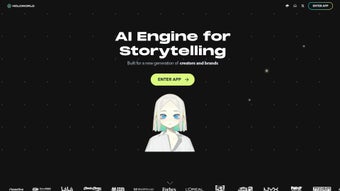
Holoworld is a breakthrough web‑based platform that places artificial intelligence at the core of 3D character creation, interaction, and social play. Built for gamers, anime fans, storytellers, educators, and anyone who enjoys immersive digital experiences, the service lets users step into a sprawling virtual arena populated with AI‑driven avatars from a wide range of genres—including anime, video games, movies, and user‑generated creations. The platform revolves around three intuitive modes—Home, Avatar, and Creator—each delivering a distinct flavor of engagement.
In Home, you can browse, sort, and filter characters based on style, popularity, or creator. Avatar mode puts you face‑to‑face with AI personalities that can converse, play mini‑games, or act as companions in collaborative sessions. Creator mode is the crown jewel: it provides a powerful yet approachable toolkit for designing your own intelligent avatars, scripting dialogues, and even crafting narrative arcs that evolve with user interaction.
Holoworld also embraces social connectivity; linking a Discord account expands your community reach, enabling real‑time voice chat, server‑based events, and cross‑platform matchmaking. Whether you’re looking to simply meet a favorite anime character, test a new AI‑driven NPC for a game prototype, or build a personalized virtual influencer, Holoworld offers a secure, free‑to‑use environment that updates continuously with fresh content and AI improvements. The platform’s emphasis on global accessibility, combined with a sleek browser interface, means you can dive in from virtually any device without the need for heavyweight installations, making it an ideal choice for both casual users and professional creators.
Key Features
Holoworld’s feature set is designed to satisfy a broad spectrum of creative needs while keeping the learning curve shallow enough for beginners. Below is a detailed look at the most compelling capabilities that set this platform apart from traditional 3D editors and AI chatbots.
- AI‑Enhanced Avatars: Characters are powered by large‑language models that enable natural conversation, adaptive behavior, and contextual storytelling.
- Three Distinct Modes: Home for browsing, Avatar for interaction, and Creator for custom avatar design.
- Rich Library of Pre‑Built Characters: Access thousands of ready‑made avatars from anime, gaming, movie, and fan‑made collections.
- Advanced Filtering & Sorting: Use genre, popularity, creation date, and AI personality traits to find exactly the character you want.
- Creator Toolkit: Drag‑and‑drop model editor, facial animation controls, voice synthesis, and scriptable dialogue trees—all within the browser.
- Discord Integration: Sync your Discord account to join community servers, host events, and share creations instantly.
- Cross‑Platform Accessibility: Runs on any modern browser—Windows, macOS, Linux, Android, and iOS—without additional downloads.
- Secure Cloud Storage: All user‑generated avatars and scripts are saved securely in the cloud, with optional private or public sharing.
- Regular Updates & Community Packs: Monthly AI model upgrades, seasonal avatar bundles, and community‑driven content packs keep the ecosystem fresh.
- Gamified Interaction: Mini‑games, quests, and achievement systems encourage deeper engagement with both pre‑built and custom characters.
Each feature has been crafted with scalability in mind, ensuring that as your projects grow—from a single hobby avatar to an entire cast of AI‑driven NPCs—you’ll find the tools you need without hitting a hard ceiling. The combination of AI depth, 3D rendering, and community‑focused social layers creates a unique sandbox where creativity meets technology.
Installation, Usage & Compatibility
Getting Started – No Heavy Installation Required
Holoworld lives entirely in the cloud, meaning you can start creating or interacting with characters in under two minutes. To begin, visit holoworld.com and click the Start for Free button. The platform automatically detects your browser capabilities and loads the optimized WebGL‑based 3D engine. For the best experience, we recommend the latest versions of Chrome, Edge, or Firefox; Safari works well on macOS and iOS, while mobile Chrome and Firefox handle Android devices gracefully. Because everything runs in the browser, you avoid the pitfalls of traditional installers—no admin rights, no registry edits, and no lingering background services.
Step‑by‑Step Usage Guide
- Create an Account: Sign up with an email address or use your Google/Discord credentials for instant access.
- Choose a Mode: Navigate the top menu to select Home, Avatar, or Creator.
- Explore the Library (Home): Apply filters, view character profiles, and click Enter World to load a 3D environment.
- Interact (Avatar): Approach an AI avatar, click the speech bubble, and type or speak your message. The AI responds in real time, using voice synthesis if enabled.
- Create (Creator): Launch the editor, import a base mesh or start from a template, customize facial features, assign personality traits, and script dialogues using the visual node editor.
- Publish & Share: Once satisfied, hit Publish. Your avatar can be set to public, private, or shared via a unique link. Use the Discord integration to announce new creations to your community.
- Stay Updated: Holoworld pushes AI model upgrades automatically. You’ll see a notification badge when new features or character packs are available.
- Export for External Use: When you’re ready to take your avatar into another engine, use the built‑in export tool to generate glTF or FBX files, complete with attached behavior scripts.
Compatibility & System Requirements
Because Holoworld runs in the browser, it is compatible with virtually any operating system that supports modern web standards. Minimum requirements include:
- CPU: Dual‑core 2 GHz or higher
- RAM: 4 GB (8 GB recommended for intensive creator sessions)
- Graphics: WebGL 2.0 compatible GPU (integrated graphics work, but a dedicated GPU improves rendering performance)
- Internet: Broadband connection (minimum 5 Mbps for smooth avatar interactions; 15 Mbps+ recommended for high‑resolution textures)
- Browser: Latest Chrome, Edge, Firefox, or Safari (mobile versions of Chrome/Firefox for Android, Safari for iOS)
No additional software downloads, plug‑ins, or runtime environments are needed. The platform also respects privacy regulations—data is encrypted in transit, and users retain full control over who can view or edit their creations.
Pros, Cons & Frequently Asked Questions
Pros
- Fully web‑based – no heavy installations or license fees.
- AI‑driven characters provide realistic, adaptable conversations.
- Robust creator toolkit suitable for beginners and advanced users.
- Cross‑platform support enables seamless switching between desktop and mobile.
- Active community and regular content updates keep the ecosystem vibrant.
- Secure cloud storage with granular privacy controls.
- Export options (glTF, FBX) make assets portable to other 3D engines.
Cons
- Performance depends on internet speed and browser efficiency.
- Complex avatar scripts may require a learning curve for non‑technical creators.
- Advanced visual effects are limited by WebGL capabilities on low‑end devices.
- Premium character packs and some AI model upgrades are paid features.
- While cloud storage is secure, users must trust the service for long‑term asset retention.
Frequently Asked Questions
Is Holoworld really free to use?
Yes, the core platform—including access to the avatar library, basic creator tools, and Discord integration—is completely free. Premium character packs and advanced AI model upgrades are offered as optional purchases.
Do I need a powerful PC to run Holoworld?
No. Because Holoworld runs in the browser, a modern laptop or even a mid‑range smartphone can handle basic interactions. For intensive creator sessions with high‑poly models, a device with at least 8 GB RAM and a dedicated GPU will deliver smoother performance.
Can I export my custom avatars to use in other games?
Holoworld currently supports export in glTF and FBX formats, allowing you to import your avatars into most 3D engines (Unity, Unreal, Blender, etc.). Exporting also includes the AI behavior scripts, which can be integrated via Holoworld’s API.
How secure is my data and my Discord integration?
All communications are encrypted with TLS 1.3. Discord OAuth tokens are stored only for authentication and never accessed directly by Holoworld. Users can revoke access at any time from their Discord security settings.
What kind of AI model powers the avatars?
Holoworld uses a proprietary blend of transformer‑based language models fine‑tuned for conversational consistency and character‑specific personality traits. The models are continuously updated to improve relevance and reduce hallucinations.
Is there any offline mode for Holoworld?
At present, Holoworld requires an internet connection because the AI inference and 3D rendering happen on remote servers. Offline functionality may be explored in future releases, but the current design prioritizes cloud‑based updates and shared experiences.
Conclusion & Call to Action
Holoworld represents a significant step forward in the convergence of AI, 3D graphics, and social interaction. By delivering a secure, free‑to‑use, browser‑based environment, it lowers the barrier for creators and fans alike to engage with intelligent avatars that feel genuinely alive. Whether you are a hobbyist looking to chat with a favorite anime hero, a developer prototyping NPC dialogue, an educator crafting interactive lessons, or an indie studio seeking rapid character prototyping, Holoworld provides the tools and community to make your vision a reality. The platform’s regular updates and expanding library ensure that the experience never becomes stale, while the seamless Discord integration keeps you connected to a global audience. If you’re ready to explore a world where imagination meets machine intelligence, click the button below, create your free account, and step into Holoworld today.
Holoworld blends AI‑driven avatars with a seamless web experience, offering creators an unprecedented level of personalization and interactivity. The platform’s three‑mode structure keeps exploration intuitive, while the creator toolkit empowers both novices and seasoned designers to build sophisticated, narrative‑rich characters. Minor performance hiccups on low‑end devices are outweighed by the sheer breadth of content and the vibrant community.



.png)



